To add a feature-rich chat room to your PunBB, please refer to the following instructions. Firstly, please download PunBB chat module, and uncompress the package. 
Then copy files. 1. Copy: 123flashchat.php
To: <PunBB installed directory>/extensions/123flashchat.php 2. Copy: login_chat.php
To: <PunBB installed directory>/extensions/login_chat.php 3. Copy: folder pun_123flashchat/
To: <PunBB installed directory>/extensions/pun_123flashchat/
Secondly, edit files. 1. Open <PunBB installed directory>/index.php Find
<?php endif; ($hook = get_hook('in_new_online_data')) ? eval($hook) : null; ?>
</div> After Add
<!--123 flash chat code start -->
<?php ($hook = get_hook('topcmm_chat')) ? eval($hook) : null; ?>
<!--123 flash chat code end --> 2. Open: <PunBB installed directory>/header.php Find
$gen_elements['<!-- forum_navlinks -->'] = '<ul>'."\n\t\t".generate_navlinks()."\n\t".'</ul>'; After Add
//123 flash chat code start
($hook = get_hook('topcmm_chatlink')) ? eval($hook) : null;
//123 flash chat code end Thirdly, configure PunBB chat module's running mode.
Please choose the running mode according to your need, and the configuration path is
<PunBB installed directory>/extensions/pun_123flashchat/config/config.php Then configure the following parameters:
$running_mode Configuration reference:
$running_mode = 1; (only 1 or 2 or 3)
1. Chat server is hosted by your own ($running_mode = 1).
If your chat is hosted by your own, 123FlashChat server software should be installed at first, please download 123FlashChat.
Configuration path:
<PunBB installed directory>/extensions/pun_123flashchat/config/config_local.php Configure the following parameters:
$chat_group = "default";
$client_size_width = 634;
$client_size_height = 476;
$chat_data_path = "<123flashchat installed directory>/server/data/default/";
$primary_server_host = "localhost";
$primary_server_port = 51127;
$chat_client_root_path = "http://<your webserver>/client/";
$swf_file_name = "123flashchat.swf";
2. Chat server is hosted by 123flashchat.com ($running_mode = 2).
If your chat is hosted by 123Flashchat.com, no 123FlashChat server software is needed to be installed; you may connect to your host chat room directly. Configuration path:
<PunBB installed directory>/extensions/pun_123flashchat/config/config_host.php Configure the following parameters:
$chat_group = "default";
$client_size_width = 634;
$client_size_height = 476;
$primary_server_host = "www.123flashchat.com";
$primary_server_port = 51127;
$chat_client_root_path = " http://host*.123flashchat.com/hostname/";
$swf_file_name = "123flashchat.swf";
3. Chat server is hosted by 123flashchat.com free of charge ($running_mode = 3).
If you prefer free hosting, then you don't have to install 123 Flash Chat server software, we take care the hosting and all you need to do is just pick a room name you want. 
Configuration path:
<PunBB installed directory>/extensions/pun_123flashchat/config/config_free.php Configure the following parameters:
$room_name = "YourRoomName"; (If you leave $room_name as blank, the default $room_name's value will be your domain's name.)
Fourthly, integrate your chat with PUNBB user database, after doing that, users can auto-login your PunBB chat, it means they won't have to enter their accounts again. If you choose running mode (1) or mode (2), you need to set Auth-URL by following the instructions below. 1. Log in the Chat Admin Panel. 2. Server Settings -> Integration ->DataBase -> SELECT: URL -> edit. 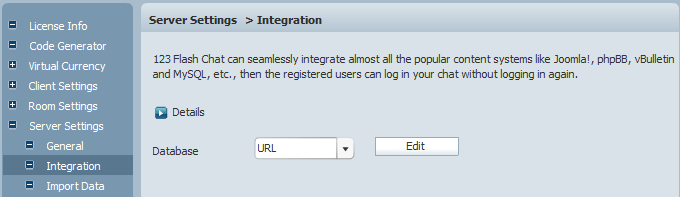
3. Change URL to
http://<PunBB installed directory>/chat/login_chat.php?username=%username%&password=%password% 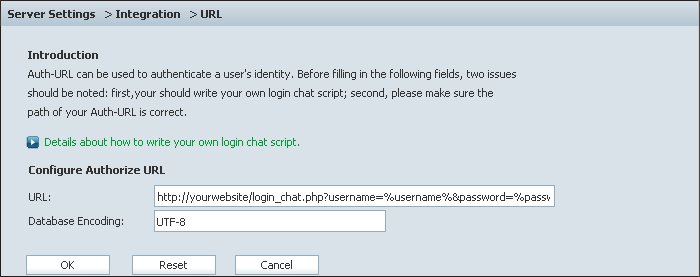
4. Press OK to save your setting. 5. Restart chat server at Server Management -> Restart.
The following image describes how auth-URL integration works. 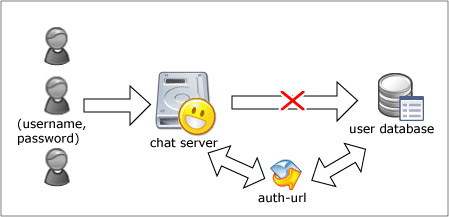
The Auth-URL application will perform as the communicating medium of the chat server and the database, i.e.: in fact, when a user logs on a chat server, the server won't connect to the user database directly, instead, it will send the username and password to the Auth- URL. Then the Auth- URL requests the database to authenticate the user. Finally, the Auth- URL will return the feedback to the chat server in a predefined way, whether approved or declined.
Finally, log in the PunBB Admin panel -> click "Administration" -> click "Extensions" 
Then find "123 Flash Chat MOD", and click "Install extension". 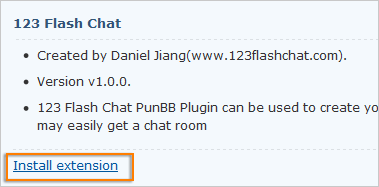
Integration done, enjoy your chat. 
If you have any questions about chat room, please visit http://www.123flashchat.com/faq.html.
You can also send email to support@123flashchat.com, we offer free integration service for license buyer and yearly hosting buyer. | 





