Share

Subscribe to 123FlashChat Facebook Twitter
How to add a Post Notifer Module to Invision Power Board?

How to add a Post Notifer Module to Invision Power Board?

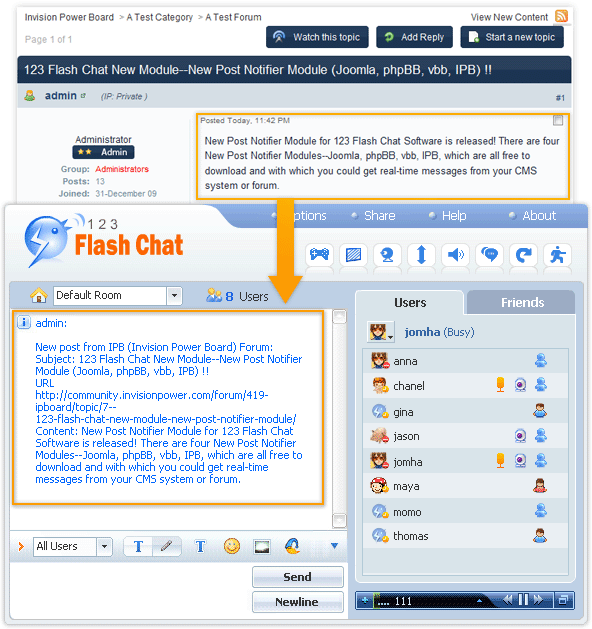
To add a Post Notifier to Invision Power Board so that users won't miss your Invision Power Board new post when in chat, please refer to the following instructions.

Firstly, download Post Notifier Module.

Download Moodle

Then copy folder post_123flashchat/ to <Your Invision Power Board installed directory>/ post_123flashchat/.

Secondly, edit files.

Please open file: <Your Invision Power Board installed directory>/index.php

Find
ipsController::run();

Before Add
include_once 'post_123flashchat/123flashchat_postnotifier.php';

Thirdly, configure the parameters of Post Notifier Moudle in
<Your Invision Power Board installed directory>/post_123flashchat/config.php.

/*
If you want to enable the module, please set the value of this parameter 'yes'.
*/
$enable module = 'yes';

/*
If you want to listen the "repaly" action in your forum or cms, please set the value of this parameter 'yes';
*/
$enable reply = 'yes';

/*
If you want to listen the "post" action in your forum or cms, please set the value of this parameter 'yes';
*/
$enable_post = 'yes';

/*
If you want to listen the "edit" action in your forum or cms, please set the value of this parameter 'yes';
*/
$enable_edit = 'yes';

/*
Please fill in with your 123 Flash Chat software installed client url
If you are 123flashchat.gr charged hosting service user, please fill in with host client url, for example: http://host718.123flashchat.gr/yourgroupname/
*/
$host_url = "localhost";

/*
Please fill in with your 123 Flash Chat software installed server port.
If you are 123flashchat.gr charged hosting service user, please fill in with blank.
*/
$host_port = '35555';

/*
If you are an 123 Flash Chat Pro Software user, please fill with current group name.
*/
$host_id = 'default';

/*
Please fill in with your notifier API password. It is for protect your API message transfer.
*/
$apipwd = '';

/*
Please fill in with your chat room id. If you want more than one rooms to get post notifier, please use "," to split rooms.
You can get room id from 123 Flash Chat Software Admin Panel.
*/
$effect_room = '1';

/*
Display color in the chat room.
*/
$text_color = '#000000';

/*
Edit "post message" for displaying in effective rooms.
Edit "reply message" for displaying in effective room.
Edit "edit message" for displaying in effective room.

Message Instruction: %SUBJECT%: Subject of IPB post article.
%CONTENT%: Content of IPB post article.
%URL%: URL of IPB post article.

*/
$post_text_message = 'New post article from IPB: %SUBJECT% %URL%';
$reply_text_message = 'New reply article from IPB: %SUBJECT% %URL%';
$edit_text_message = 'New edit article from IPB: %SUBJECT% %URL%';

/*
Allow max words to be shown in a chat window, if number is not integer values or small than 10 words, it will be automatically changed to 260.
*/
$max_word = 260;

Done, enjoy this module.

Done, enjoy this module.

If you have any questions about it, please visit http://www.123flashchat.gr/faq.html.

You can also send email to support@123flashchat.gr, we offer free integration service for license buyer and yearly hosting buyer.


About Us | Contact us | Company Blog | Partnership | Affiliate | Forum | Privacy policy | Terms of Use | SiteMap | Links

Call Sales Now! USA 408-728-6398, UK +44-20-3286-1986, HK +852-8121-1988

Share 123 Flash Chat:

Copyright © TopCMM Software Limited 2001-2016 All Rights Reserved.

Powered by Greek-Chat.gr