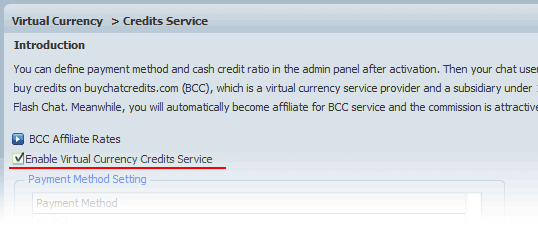
First of all, "Enable Virtual Currency Credits Service " in Admin Panel-> Virtual Currency , because it's the foundation of the PPM and virtual gifts system.
Who can enable the credits service? Only 123FlashChat license or host buyers are qualified to enable it manually, consequently you will automatically become affiliate for BCC service (buychatcredits.com), which is a virtual currency service provider and a subsidiary under 123 Flash Chat, and the commission is attractive! (Credits service is enabled to trial version users too, however, the chat owner won't get revenue at all.)
What are the benefits to be affiliate of BCC then? You may login BCC to check your users credits change history and your commission easily! And you will get commission in cash periodically.
What else can be done? Here you may also define payment method and cash credit ratio, then your chat users can buy credits on BCC and you get most of the revenue.
What's next? After enabling it, a dialog will pop up with two shortcuts for you to configure virtual gifts or Pay Per Minute mode. Choose the latter one.
Enable PPM Mode
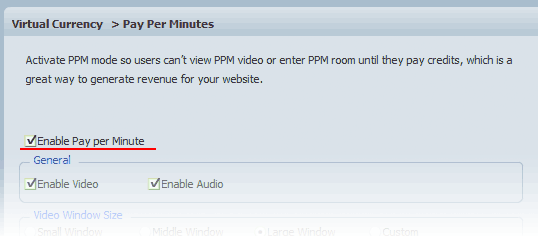
Admin Panel-> Virtual Currency -> Pay per Minute, Enable Pay per Minute. It's a global control for all rooms, and it includes PPM video and PPM room.
What else can be done? Here you may also control video and audio, define the video size and quality, or simply skip.
What's next? A dialog will pop up with shortcut for you to configure PPM mode per specific room . (By default it will take you to the first room.)
PPM Per Room Setting
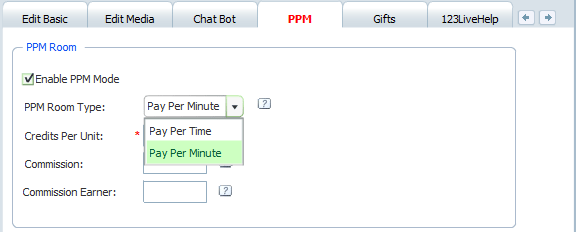
Admin Panel -> Room Settings, choose a specific room or create a new room, Choose the tab "PPM", then "Enable PPM mode" for this room or "Enable PPM video" for all users in this room.
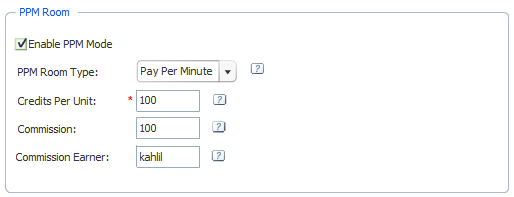
PPM Room
Settings
Enable PPM Mode Click it so users have to pay credits to enter this chat room.
PPM Room Type Pay per time or pay per minute, which respectively means that users will be charged per time or per minute.
Credits Per Unit Enter the credits amount, which respectively means the credits consumed per time or per minute. Choose a value carefully so users won't be scared away while still keeping it profitable, and adjust it periodically if necessary.
Commission It can be a reward to those who have invited friends to your room, or the broadcaster star.
Commission Earner Enter a username for whom to get commission when anyone enters the PPM room. It can be a broadcaster star for instance.
An example,
PPM Video
Precondition Before enabling PPM video, please make sure you have purchased the video chat module ($299) and enabled it already.
Settings
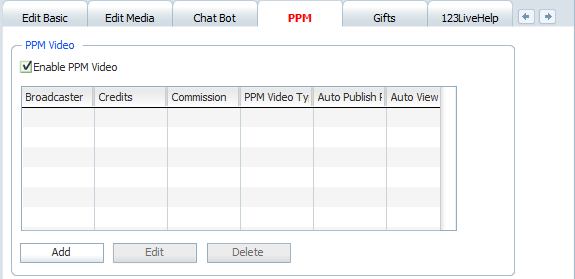
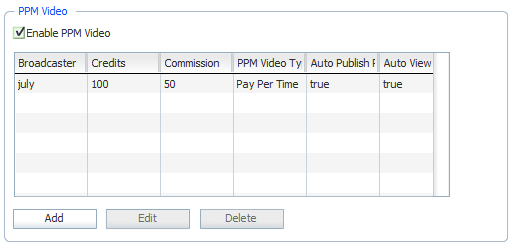
Enable PPM Video Click it so users have to pay credits to view the video session of any predefined broadcaster.
Broadcaster Define who can publish PPM video in the current chat room and charge for it. Those who aren't in this list will not get credits even if he/she publish video in this room.
Credits Price per minute or per time.
Commission Define the part of credits that the broadcaster can get.
PPM Video Type Pay per time or pay per minute, which respectively means that users will be charged per time or per minute.
Auto Publish PPM Video Make the video of the broadcaster automatically open to anyone who enters the current room.
Auto View PPM Video Open the PPM video automatically to anyone who enters the current chat room.