Features

How to Enable Virtual Gift in a Chat Room?

With the virtual gifting system, chat users can send fun animations to other users or friends. Here is a brief tutorial to show the admin how to enable it.

1. Enable Virtual Currency

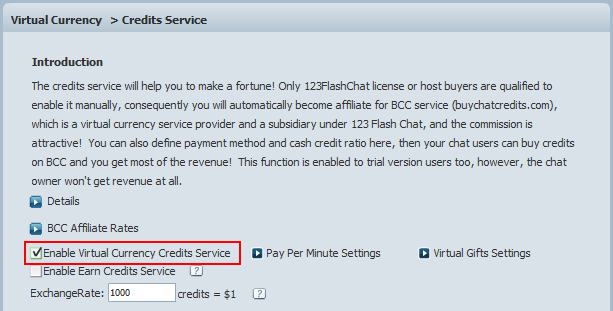
Login admin panel-> Virtual Currency-> Credits Service, check "Enable Virtual Currency Credits Service" and save it.

Enable Virtual Currency Credits Service of 123 Flash Chat, Chat Software


2. Enable Global Virtual Gifts

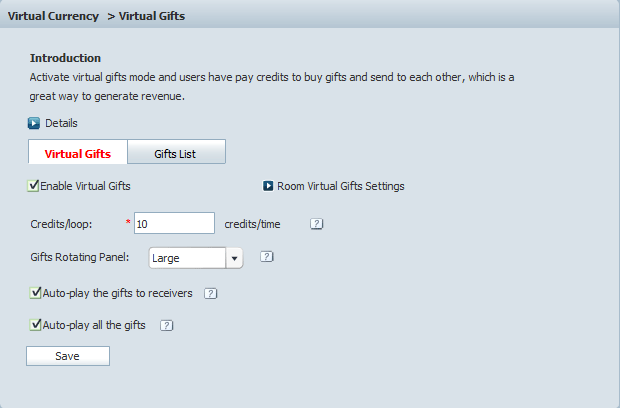
Login admin panel-> Virtual Currency-> Virtual Gifts, click "Enable Virtual Gifts" and save.

Credits/loop
It defines how many credits will be consumed for showing in the loop gifts panel each time. For example, Credits/loop=50 means if the gift worths 100 credits, then the gift will show 100/50=2 times there.

Gifts Rotating Panel: Large/Small/Hidden
Choose Small panel to show text notice only; Or choose Large panel to show gift thumbnail and text notice on the gifts rotating panel, even you can hide the panel.

Auto-play the gifts to receivers
The gifts will automatically play to the receivers.

Auto-play all the gifts
The gifts will automatically play to all the users in the current chat room, whether receive it or not.

3. Enable Gift for a Specific Room

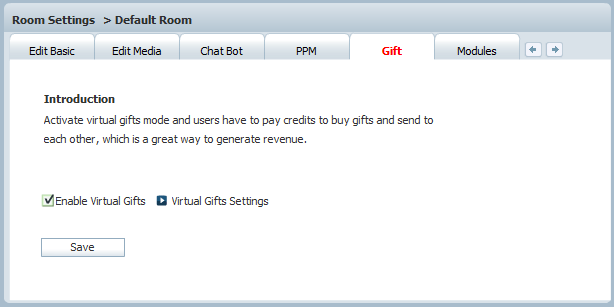
Login admin panel-> Room Settings-> a specific room name-> Gift, click "Enable Virtual Gifts" and save.

4. Success!

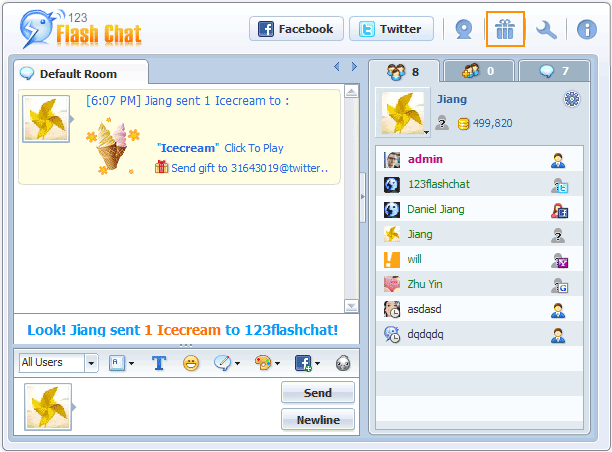
In the specific chat room, the send gift button will be available on the top, and users can click to send a gift to others.

About Us | Contact us | Company Blog | Partnership | Affiliate | Forum | Privacy policy | Terms of Use | SiteMap | Links

Call Sales Now! USA 408-728-6398, UK +44-20-3286-1986, HK +852-8121-1988

Share 123 Flash Chat:

Copyright © TopCMM Software Limited 2001-2016 All Rights Reserved.

Powered by Greek-Chat.gr