|
Features How to DIY virtual gifts by yourself?Virtual gifts are fun animations chat users can send to each other in a 123 Flash Chat room. They are independent to the main chat client 123flashchat.swf and chat owner may design and add your own virtual gifts easily. Gift Animation Regulations
Gift Animation: The SWF should be compiled using Flash 9.0 or above version, otherwise it may not play in the chat room. Step by Step Instructions
Step 1Copy gift animation to <123flashchat installed directory>\client\gifts\SWF\ Step 2Copy the gift thumbnail to <123flashchat installed directory>\client\gifts\thumb\ Tips
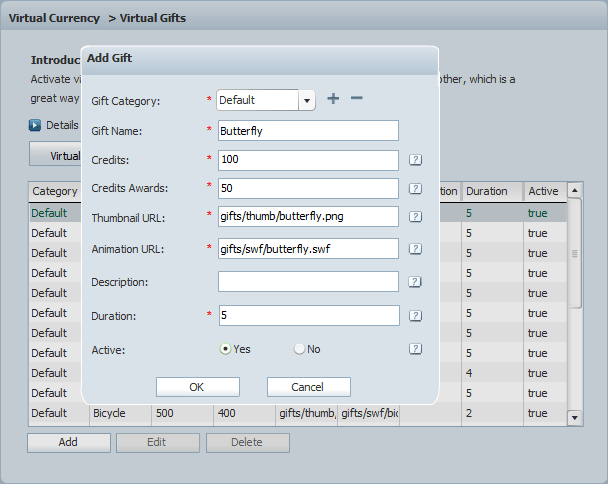
Step 3Admin Panel -> Virtual Currency -> Virtual Gifts -> Gifts List, click Add button to add gift one by one and define the price and duration, etc.
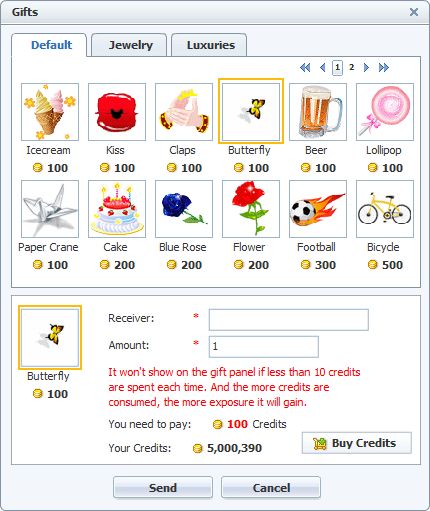
The newly added gift will be listed in the gifts panel, and help chat users expressing their feelings to each other.
That's it, enjoy it! If you want to share the great gift animations to all of the world, please send the animations and their thumbnails to support@123flashchat.gr and we'll add it to our collection. Thanks! |

| |||||||||||||||||||
 |